Problem Description
While playing Path of Exile 2, the game completely froze on the loading screen while fast traveling to a certain location. After freezing, the game crashed, and I loaded it back up to verify that this issue is persistent.
Environment
This game has been kept on this PC for a while now. I have checked Steam to ensure that there were no updates needed. My GPU was already on the most recent version. I remained unsure what the issue could have been.
Investigation and Troubleshooting
A possible issue that came to mind was whether game files were installed correctly. I used Steam's verify integrity to ensure this. After Steam successfully reacquired the files, I checked to see if the game issue was resolved, but it was not.
Next, I thought it could be a corrupted storage issue. I started the CMD application as administrator. I've used this command:
- sfc /scannow
Fortunately, no corrupted files were detected on the device. That's when I realized I didn't know what the issue could've been. I was stumped, but then I had the idea to check the event viewer. I took a look and noticed the crash was recorded, and it suggests using CHKDSK to repair the file system. But I had another idea in mind because in the details of the Event, it states Windows is unable to reach this file path:
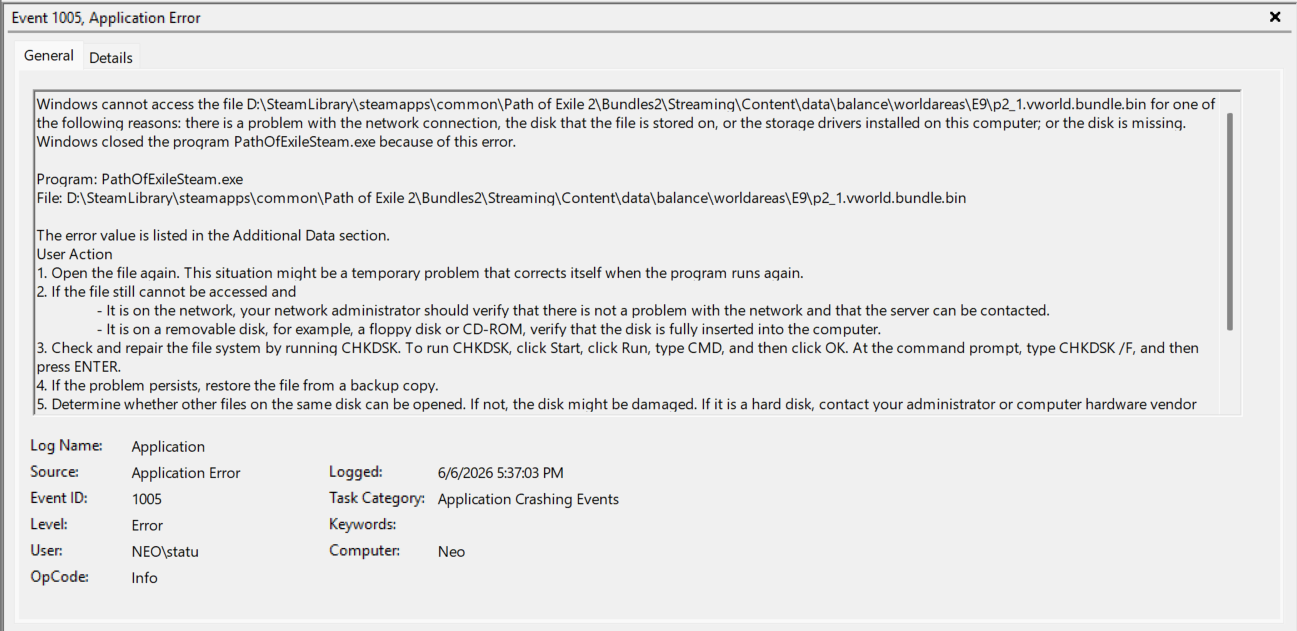
I remembered that if I deleted the file or folder, Steam would just reacquire that file, which led me to take the following steps:
- Searched the directory for the file specified in the Event Viewer.
- Deleted the entire E9 folder with p2_1.vworld.bundle.bin
- Verified file integrity on Steam to reacquire the file
Resolution
Upon starting the game, I quickly tried to fast travel to the location again. The game didn't freeze, and it loaded successfully without crashing.